



Innerspark.us – Organizing an artwork portfolio homepage requires a strategic curation process that prioritizes your strongest pieces while utilizing a clean, intuitive navigation structure to guide visitors through your creative evolution. A successful portfolio acts as a visual narrative, balancing high-impact featured projects with easy-to-browse categorical galleries.
The Strategic Approach to Portfolio Curation
The biggest mistake artists make is displaying every single piece they have ever created. Your portfolio is not an archive; it is a curated selection of your professional capabilities. When a visitor lands on your homepage, they should instantly understand your artistic identity, your medium, and the level of quality they can expect if they hire you or purchase your work.
Start by identifying your “hero” pieces. These are the works that represent your current skill set and the type of commissions or sales you want to attract in the future. If you are transitioning from traditional painting to digital illustration, prioritize the digital work on your landing page. Your homepage must reflect where you are going, not necessarily where you started.
📷 Photo by amazon.com
Structuring Your Homepage Layout
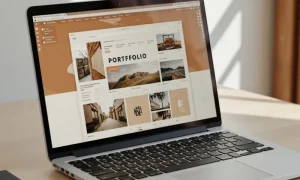
A high-converting portfolio homepage utilizes a hierarchy of visual information. Use a grid-based layout for your primary gallery to keep the interface clean and organized. Each thumbnail should be high-resolution, consistent in aspect ratio, and clearly representative of the project it leads to. Avoid cluttering the homepage with excessive text; let the visuals do the heavy lifting.
Consider the following organizational framework to ensure your audience remains engaged without feeling overwhelmed by the volume of content:
| Organizational Tier | Description | Purpose |
|---|---|---|
| Hero Section | High-impact, singular image or carousel | Immediate brand recognition |
| Featured Works | Grid layout of 6 to 9 top-tier projects | Showcasing core competencies |
| Categorical Links | Buttons or icons for specific styles | Improving user navigation |
| About/Contact | Concise bio and call to action | Conversion and trust-building |
Step-by-Step Guide to Organizing Your Portfolio
Organizing a large collection can be daunting, but following a systematic workflow will help you create a professional-grade homepage. Use this process to refine your collection:
- Audit your entire body of work and create a master folder of high-quality digital files.
- Select your top 10 pieces that align with your current professional goals or desired niche.
- Group these pieces into logical categories, such as “Portraiture,” “Abstract,” or “Commercial Illustration.”
- Design your homepage grid, placing your strongest work in the top-left position, as this is where the eye naturally travels first.
- Optimize file sizes for web speed to ensure your gallery loads instantly, as slow load times lead to high bounce rates.
- Add descriptive captions or meta-tags to each piece to improve accessibility and search engine visibility.
- Review the mobile responsiveness of your grid to ensure the layout remains clean on smaller screens.
Common Pitfalls and How to Avoid Them
One common error is the lack of context. Simply posting an image is often not enough for potential clients who want to understand your process. When a user clicks on a thumbnail, they should be taken to a project page that explains the challenge, your creative approach, and the final outcome. This narrative depth turns a casual viewer into a potential client.
📷 Photo by amazon.co.uk
Another issue is inconsistent branding. If your homepage features a mix of wildly different styles without clear separation, it can confuse the viewer about your specialization. If you must show multiple styles, use distinct galleries or sub-folders to keep the homepage from appearing chaotic. Complexity is the enemy of conversion; keep the navigation simple and the path to your contact information clear.
The Role of White Space
Never underestimate the power of white space, or negative space, in your design. It allows the eyes to rest and gives each piece of artwork the room it needs to breathe. If your thumbnails are packed too tightly together, the portfolio feels cramped and unprofessional. Aim for generous margins between images to create a gallery-like experience that feels premium and curated.
Ensure that your color palette for the website supports your art rather than competing with it. A neutral background—white, light gray, or deep black—is usually the best choice for a portfolio site. These colors act as a frame for your art, ensuring that the focus remains entirely on your creative output rather than the website design itself.
Frequently Asked Questions
Q: How often should I update my portfolio homepage?
A: You should aim to update your homepage every three to six months. Regularly cycling out older work for newer, more refined pieces keeps your portfolio feeling fresh and demonstrates your continued growth as an artist.
Q: Should I include prices directly on my portfolio homepage?
A: Generally, it is better to leave pricing off the homepage. Use the homepage to generate interest and direct visitors to a specific “Shop” page or a “Request a Quote” form, as this allows you to manage expectations and professional relationships more effectively.
Q: Is it better to have one long scrolling page or multiple category pages?
A: For most artists, a hybrid approach works best. A single, well-curated scrolling homepage that highlights your best work, with clear links to deeper, category-specific pages, provides the best user experience and SEO benefits.
Final Thoughts on Maintenance
📷 Photo by snapklik.com
Maintaining a portfolio is an ongoing task, not a one-time project. As you evolve, your homepage should evolve with you. Periodically review your analytics to see which works are receiving the most clicks. If a specific category is underperforming, consider swapping the images or updating the thumbnails to see if engagement improves. Your portfolio is a living document of your career, and treating it with the same care you give your artwork will yield significant professional dividends.
📷 Photo by amazon.ca