
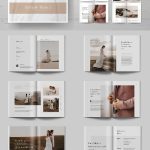


Innerspark.us – An interactive digital lookbook for art prints is a curated, clickable presentation that allows potential buyers to explore your collection, view high-resolution details, and purchase items directly through integrated links. By combining aesthetic storytelling with seamless user interface design, artists can transform a static portfolio into a high-conversion sales tool.
The modern digital art market demands more than just a gallery page on a website. Collectors want an experience that mimics the tactile nature of browsing through a physical catalog. An interactive lookbook bridges the gap between digital convenience and physical appreciation, providing a cohesive narrative that showcases how your prints look in real-world settings.
Why Interactive Lookbooks Outperform Static Galleries
Static galleries often suffer from “decision fatigue” or lack of context. When a customer views a single print in isolation, they may struggle to visualize how that piece fits into their home decor. An interactive lookbook solves this by placing your art in curated rooms, offering style guides, and providing direct paths to checkout.
Furthermore, interactive formats allow you to track engagement. By using digital publishing platforms, you can see which pages are viewed the longest and which links get the most clicks. This data is invaluable for refining your future collections and understanding your audience’s aesthetic preferences.
Essential Elements of a High-Converting Lookbook
To create a lookbook that actually drives sales, you must balance visual appeal with technical functionality. Your layout should be clean, with plenty of white space to let the art breathe. High-quality imagery is non-negotiable; if the viewer cannot see the texture of the paper or the vibrancy of the ink, they are unlikely to commit to a purchase.
Include lifestyle photography whenever possible. Showing a print framed above a sofa or as part of a gallery wall helps the customer visualize the product in their own space. This emotional connection is the primary driver of conversion in the art print industry.
Technical Specifications for Digital Lookbooks
| Feature | Recommended Specification | Purpose |
|---|---|---|
| Resolution | 300 DPI for print-ready previews | Ensures clarity when zoomed in |
| File Format | Interactive PDF or HTML5 | Ensures cross-device compatibility |
| Aspect Ratio | 16:9 or 3:2 | Optimized for desktop and tablet screens |
| Navigation | Clickable index and back-to-top buttons | Reduces user friction during browsing |
Step-by-Step Guide to Creating Your Lookbook
- Curate your collection by selecting a theme, such as a specific color palette, artistic style, or seasonal inspiration, to ensure the lookbook feels cohesive.
- Design your layout using tools like Canva, Adobe InDesign, or specialized digital publishing platforms like Issuu or Flipsnack, ensuring your brand identity is consistent across all pages.
- Integrate high-resolution lifestyle images that place your art prints in actual interior design contexts to help customers visualize the scale and impact.
- Embed interactive hotspots or clickable buttons on every product page that link directly to your e-commerce checkout page or specific product listing.
- Export your final project as an HTML5 flipbook or a hyperlinked PDF to ensure it remains fast-loading and interactive across all mobile and desktop devices.
Common Mistakes to Avoid
One of the most frequent errors artists make is neglecting mobile optimization. Many users will view your lookbook on a smartphone while on the go. If your text is too small or your buttons are difficult to tap, you will lose a significant portion of your traffic. Always test your final export on at least three different screen sizes before publishing.
Another pitfall is “over-designing.” While it is tempting to use complex animations or heavy background textures, these elements can distract from the art itself. Remember that the art print is the hero of the story. Your design should act as a frame, not an obstacle.
Strategies for Distribution
Once your lookbook is live, do not just hide it on your website’s footer. Treat it like a product launch. Send it to your email subscribers as an exclusive preview, share snippets of it on social media platforms like Instagram or Pinterest, and offer a “behind-the-scenes” look at how you curated the selection.
Consider using the lookbook as a lead magnet. By offering a downloadable high-resolution version or a special discount code for those who read through the entire catalog, you can grow your mailing list while simultaneously driving sales.
Frequently Asked Questions
Q: What is the best platform to host my interactive lookbook?
📷 Photo by fadmagazine.com
A: Platforms like Flipsnack, Issuu, and Heyzine are excellent for creating page-turning effects, while Adobe InDesign combined with a self-hosted web page provides the most control for advanced users.
Q: Should I include pricing directly in the lookbook?
A: Including pricing can reduce friction for buyers, but if your prices fluctuate or you offer frequent sales, it is safer to use a “View Price” button that links to a live, updated product page.
Q: How long should my lookbook be?
A: Aim for 10 to 20 pages. This is long enough to tell a compelling story and showcase a variety of work, but short enough to keep the viewer’s attention from wandering.
Ultimately, your lookbook is an extension of your artistic voice. By investing time into the layout, ensuring technical accessibility, and providing a clear path to purchase, you elevate your brand from a simple seller of prints to a curator of experiences. Stay consistent with your aesthetic, keep the navigation intuitive, and let your art speak for itself through a professional, digital lens.
📷 Photo by creativebloq.com